The most common technical question in the OrderFlow sales process is also the most reasonable one: "We've heard 'easy ERP integration' before. What does it actually mean?"
It's a fair question. Distribution IT teams have lived through integrations that were described as straightforward and took six months. They've deployed "pre-built connectors" that required substantial custom development. They've watched automation projects fail not because the AI was wrong, but because the integration couldn't deliver data in the format the ERP expected.
This article explains how AI order processing integration actually works, at the architecture level, for the ERP platforms most common in distribution. No vague claims about "connecting seamlessly." Specific answers about what connects to what, how data flows, and what IT has to maintain.
The integration challenge with traditional order automation
Why EDI and RPA integrations require ongoing IT maintenance
Traditional order automation approaches require IT maintenance because the integration is tightly coupled to the input format.
EDI integrations map specific fields in a structured electronic document to specific fields in the ERP. Change the document layout on either end — a trading partner upgrades their ERP, you change your order entry workflow, a new field gets added — and the mapping breaks. Someone from IT has to update the mapping before the integration works again.
RPA bots automate keystrokes against a specific screen layout. They watch for a field at position X on screen Y and enter a value. When the ERP upgrades and the screen layout changes, the bot fails. RPA maintenance for order automation is typically one to three IT hours per month per integration, across every customer with a configured bot.
For a distributor with 50 automated customers, that's 50 to 150 IT hours per month just keeping the automation running — not improving it.
The AI approach: standardize at the output, not the input
AI order processing inverts the integration problem. Instead of requiring each input format to conform to a standard before the integration can work, the AI handles format variability at the ingestion layer and produces standardized structured output regardless of what came in.
The integration point moves to the output side, where the format is controlled by the software, not the customer. The AI always produces a standardized JSON object representing an order: customer ID, line items (SKU, quantity, unit, price), delivery requirements, order reference. Your ERP's order entry API always accepts the same JSON structure. The integration is stable.
When a customer changes how they send orders, nothing in the integration layer changes. The AI adapts. The ERP endpoint doesn't move. IT isn't involved.
How AI order processing integrates with your ERP
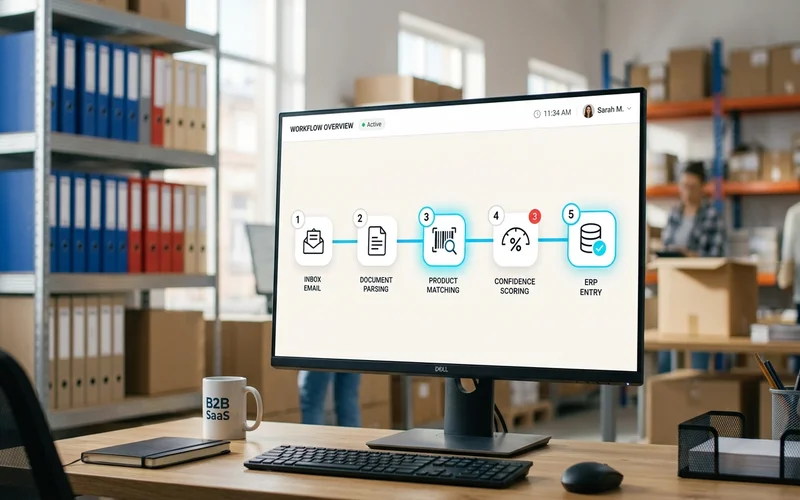
Step 1: Order captured from any source
Orders arrive via email, customer portal, EDI, or document upload. The AI system monitors a dedicated email address and ingests orders as they arrive. No manual routing or inbox management required.
Step 2: AI produces standardized structured output
The AI interprets the incoming order in whatever format it arrived and produces a standardized JSON order object. A free-text email becomes the same JSON structure as a structured PDF purchase order or an EDI 850 transaction. The output format is always the same. The ERP integration consumes only this standard output and doesn't need to know or care what format the customer used.
This is the architectural decision that makes ERP integration simple. The complexity is handled in the AI layer, not the integration layer. The how AI processes email orders article covers the interpretation pipeline in detail.
Step 3: Standard integration layer pushes to ERP
The standardized JSON order object is pushed to your ERP via the ERP's standard order entry API. For SAP, this is the sales order creation BAPI or REST API. For Dynamics 365, it's the Sales Order entity API. For Sage, it's the sales order endpoint. For NetSuite, it's the SuiteScript or SuiteTalk REST API.
These are the same API endpoints that other integrations already use. If you have any other system connected to your ERP (a customer portal, a B2B ecommerce platform, an EDI network), you've already proven the endpoint works. AI order processing uses the same mechanism.
For ERPs without a standard REST API (older SAP versions, regional ERPs, highly customized implementations), file-based integration via SFTP is available as a fallback. The AI produces a structured file in the format your ERP imports, and the file transfer handles delivery. This is less real-time than API but still eliminates manual entry.
Step 4: ERP confirmation feedback loop
After the ERP creates the sales order, it returns a confirmation (order number, status, any validation errors). The AI system captures this and uses it to send order confirmations to the customer automatically. If the ERP returns a validation error (credit limit exceeded, item out of stock, pricing discrepancy), the system routes the order to the exception queue for human review rather than silently failing.

ERP-specific integration notes
SAP (S/4HANA and Business One)
SAP S/4HANA exposes sales order creation via BAPI (RFC) and OData REST API. OrderFlow uses the OData REST API for S/4HANA deployments, which is the standard integration mechanism supported by SAP and doesn't require custom development or ABAP modifications.
SAP Business One uses the Service Layer REST API for business object creation. Sales order creation via the Service Layer is a standard, supported integration pattern. No custom development is required for standard Business One configurations.
Custom SAP configurations — bespoke pricing procedures, custom order types, non-standard approval workflows — may require a brief proof-of-concept to verify that the standard API output matches what the custom configuration expects. Most standard SAP order processing configurations work without customization.
Microsoft Dynamics 365
Dynamics 365 Finance and Supply Chain exposes sales order creation via the Data Management Framework (DMF) and REST entities. OrderFlow uses the standard Sales Order Header/Line entity endpoints, which are maintained across Dynamics version updates.
For Dynamics Business Central, the standard sales order API is used. Business Central's OData v4 API for sales orders is stable and well-documented.
Sage
Sage 200, Sage 300, and Sage X3 each have distinct API architectures, but all expose sales order creation via REST or SOAP endpoints. OrderFlow has pre-built connectors for the Sage platforms most common in distribution. Older Sage 50 installations without a REST API use file-based integration.
NetSuite
NetSuite exposes sales order creation via SuiteScript and the REST Record API. The REST API is the recommended integration path for new implementations. NetSuite's SuiteTalk also supports SOAP-based integration for legacy deployments. Standard configurations work without SuiteScript customization.
Custom and regional ERPs
For ERPs not in the above list, OrderFlow's integration approach is to identify the sales order creation endpoint (REST, SOAP, or file-based) and configure the output mapping to match. This requires a brief proof-of-concept phase (typically two to five days of IT time) to confirm the endpoint schema and test end-to-end data flow.
If your ERP has a sales order import function but no documented API, file-based integration via a structured format (CSV, XML, JSON) the ERP expects is the standard fallback.
Discuss Your ERP Integration Requirements
What integration actually requires from IT
Standard APIs and credentials
The integration requires API credentials (service account, OAuth client, or API key depending on the ERP) and the endpoint URL for your ERP instance. No code deployment on the ERP side. No custom modules. No ABAP or APEX development. The credentials are configured once.
Test environment access
Before going live, integration is validated in your ERP test environment. This requires read and write access to the test instance for the service account. IT controls this access and approves the credential setup.
Typical IT hours
| Phase | Typical IT hours |
|---|---|
| Credential setup and API configuration | 2 – 4 hours |
| Test environment validation | 2 – 5 hours |
| End-to-end testing with real order samples | 1 – 4 hours |
| Go-live sign-off | 1 hour |
| Total setup | 5 – 15 hours |
| Ongoing monthly maintenance | < 1 hour |
These are typical ranges for standard ERP configurations. Complex or highly customized ERPs may require more. The claim that this takes "days, not months" is specifically because there's no per-customer template configuration and no custom code development — just connecting the AI's standard output to your ERP's standard input.
A live deployment: Meesenburg Romania
Meesenburg Romania's ERP integration with OrderFlow is a production example of this architecture in operation. Their order inbox receives customer orders in varied formats. The AI interprets each order, produces standardized output, and pushes confirmed orders to the ERP via API.
The integration has been running in production without requiring IT intervention for routine order processing. The order processing automation deployment achieved 98% no-modification accuracy on live orders, meaning 98% of AI-processed orders entered the ERP without correction.
From Meesenburg's experience: the ERP integration was operational within weeks of project kickoff. IT involvement was front-loaded in the setup phase and dropped to near-zero for ongoing maintenance once the integration was confirmed in production.
For distributors evaluating the IT overhead of an order automation integration, that's the production answer: a few days of IT time upfront, then standard monitoring.
The complete guide covers the full implementation sequence including integration setup, pilot phase, and production rollout in detail.
Book a Technical Demo — Bring Your IT Team
Frequently Asked Questions
How does AI order processing integrate with our ERP?
AI order processing integrates as an intake layer via standard API. The AI handles format variability and produces standardized JSON output; your ERP consumes that output via its standard order entry endpoint. No custom development is required for standard ERP configurations.
Does ERP order integration require custom development?
Not for standard ERP configurations. Pre-built API connectors are available for SAP, Dynamics 365, Sage, and NetSuite. Custom or regional ERPs may require a brief proof-of-concept to confirm connector compatibility. Typical IT involvement is five to fifteen hours for setup and under one hour per month for maintenance.
Which ERP systems does AI order processing support?
OrderFlow integrates with SAP S/4HANA, SAP Business One, Microsoft Dynamics 365, Sage (multiple editions), and NetSuite via pre-built API connectors. Custom ERPs are supported via configurable connectors or file-based integration.
How long does ERP integration take to set up?
Five to fifteen hours of IT time over one to two weeks for standard configurations. This includes credential setup, test environment validation, and end-to-end testing. Total time from kickoff to live processing is two to four weeks.
What happens if the ERP changes versions?
Standard REST API endpoints are version-stable on major ERP platforms. ERP version updates rarely require integration rework for API-connected tools. Template-based integrations are much more version-sensitive — which is why AI-based integrations have lower ongoing maintenance overhead than legacy automation.