
AI order processing isn't a new category of business software that appeared last year. It's a specific application of language understanding to a problem that distribution businesses have had for decades: getting unstructured incoming orders into an ERP without paying someone to type them in by hand.
Understanding what AI order processing actually does — and what it doesn't do — takes about ten minutes. That's what this guide covers.
The problem AI order processing is built to solve
Why format variability is the real bottleneck, not volume
Most distribution businesses could handle twice their order volume with no technology changes at all, as long as every order arrived as a clean, structured EDI transaction. The problem isn't volume. It's the format.
Small and mid-size customers don't send EDI. They email. Some write "the usual 40mm fittings plus 20 extra of the blue ones." Some forward a text message from a contractor with informal part references. Some attach a spreadsheet with columns that don't match your catalog fields. Some send a photo of a handwritten list.
Each of those formats requires a human who understands the customer, knows your catalog, and can translate informal communication into a structured ERP line item. An experienced CSR who knows the account solves it in a few minutes. A newer team member might take 15, with a higher error rate. Either way, you're paying for interpretation work that happens hundreds of times a day.
Where OCR, EDI, and RPA templates fall short
The tools designed to automate document processing before AI came along have a shared limitation: they assume structure.
OCR extracts text from a fixed position on a page. A PDF PO that has the customer name in the top right, line items in a table, and the total at the bottom can be processed by OCR if you build the template correctly. When the customer upgrades their procurement software and the layout shifts, the template breaks. When a customer sends an email instead of a PDF, OCR has nothing to extract from.
EDI handles structured electronic data between trading partners who have agreed on a common standard. It works well for the 30 to 40% of distribution order volume that comes from large enterprise accounts with EDI infrastructure. The other 60 to 70% — smaller customers who email informally — is explicitly outside EDI's scope.
RPA bots automate repetitive, rule-based actions. They're useful for copying confirmed data from one system to another when the format is fixed. They're not useful for interpreting what a customer means when they describe a product by a nickname that doesn't appear in your catalog.
AI order processing is different for one reason: it reads meaning, not structure.
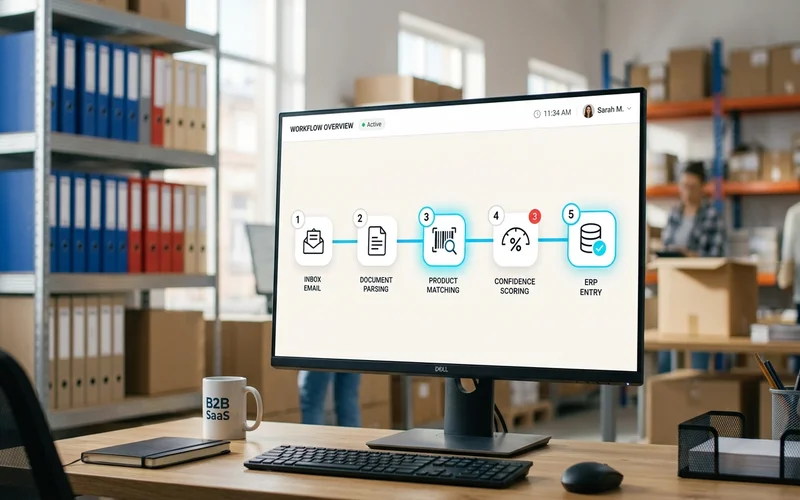
How AI order processing actually works, step by step
Step 1: Monitor the inbox (continuous, automated)
The system watches a dedicated email address around the clock. Every incoming message is captured as it arrives. You don't triage the inbox. You don't forward emails to a processing queue. The system sees each message and starts working on it immediately.
Step 2: Interpret any order format (OCR plus language understanding)
The system determines what type of content has arrived. A PDF attachment gets OCR text extraction. A free-text email goes directly to language interpretation. A forwarded thread is parsed for the relevant order content within the chain rather than treating the entire thread as a single order.
At this stage, the system isn't just extracting text. It's building an interpretation of what the customer is asking for. "Same as last week but hold the gaskets and double the 40mm blue" requires understanding that "last week" refers to a prior order, "hold" is a removal instruction, and "40mm blue" is a product reference that needs to be resolved against catalog context.
This is where AI order processing diverges from template-based tools. The templates assume the customer sends data in a predictable format. The AI reads what the customer actually sent.
Step 3: Match products to your catalog (even with informal names)
Interpreted line items are matched to your ERP catalog. The system builds a semantic understanding of your products over time, including customer-specific naming conventions, common abbreviations, variant relationships between SKUs, and ordering patterns.
When a customer refers to a product informally, the system reasons about which SKU most likely matches based on account history and catalog structure. Each match receives a confidence score. High-confidence matches proceed automatically. Low-confidence matches get flagged.
This step is where most order automation tools fail in practice. Extracting text from an email is solvable. Knowing that "the 40mm blue coupling for the cooling towers" maps to SKU-4892-B in your specific catalog, given this customer's history, is harder. The how AI processes email orders deep-dive covers the matching pipeline in technical detail.
Step 4: Flag uncertain cases for human review
Items that fall below the confidence threshold appear in a review dashboard. The reviewer sees the order, the AI's proposed match, the confidence score, and alternative options. Confirming or correcting takes seconds, not minutes, because the AI has already done the interpretation work.
Nothing enters your ERP without passing either the automated confidence check or a human confirmation. The exception queue is the system working correctly, not failing.
Step 5: Push confirmed orders to ERP automatically
Confirmed order data pushes directly to your ERP via API. No manual re-keying. No copy-paste errors. The data that enters your system is the same data that was confirmed in the review step.
ERP entry is where most transcription errors occur in manual processing: wrong quantities, transposed product codes, the wrong unit of measure. Automated API push eliminates that category of error entirely.
What "AI" means in this context, and what it doesn't mean
It's not replacing your order desk team
The 50% full automation rate at Meesenburg Romania means 50% of orders went from email to ERP with no human involvement. The other 50% went through human review of flagged items. That's by design, not by limitation.
Your experienced CSRs add genuine value on the edge cases: unusual product references, new customers, ambiguous quantities, orders that arrive with problems that need customer contact. What changes is that they're spending time on those actual judgment calls rather than on data entry for the 98% of orders that were never uncertain.
It's not a black box
A common concern about AI in business operations is that the system makes decisions you can't see or audit. AI order processing as implemented in production tools is the opposite of opaque. Every line item has a confidence score. Every decision is logged. The review dashboard shows you exactly what the AI proposed and why. Your team confirms or overrides in full view of the reasoning.
What AI order processing looks like in practice: Meesenburg Romania
Meesenburg Romania distributes industrial components across multiple product categories. Their order inbox included structured documents from larger accounts and free-text emails from a broad base of smaller customers, covering a catalog with thousands of items.
Before automation, each order required a CSR to read, interpret, match to catalog, enter to ERP, and confirm. For an experienced rep who knew the account, a clean order took 5 to 8 minutes. Ambiguous orders, unfamiliar customers, or unusual product combinations took longer.
After implementing AI order processing through OrderFlow:
- 98% of orders needed no modification after AI processing. The system matched the catalog with enough accuracy that the team accepted the output without correction on nearly every order.
- 50% of orders completed end-to-end with no human involvement from email receipt to ERP entry.
- The order desk's work shifted from data entry to decision-making on the specific items the AI explicitly flagged as uncertain.
Banciu Nicolae, General Manager at Meesenburg Romania, confirmed these results came from live production operations on the actual inbox, not a controlled test environment.
See AI Order Processing on Your Own Order Formats
Is AI order processing right for your distribution business?
Three indicators that it's worth evaluating seriously:
Your order desk spends most of its day on manual data entry. If your CSR team's primary activity is reading emails, looking up products, and entering line items, that's the work AI order processing eliminates.
Format variability is your bottleneck. If different customers send orders differently, and you've ruled out forcing them onto EDI or a customer portal, AI order processing handles the variability without templates.
You've tried OCR or RPA and been disappointed. Template-based tools fail for the reasons described above. If you were promised automation and ended up with a maintenance burden instead, the issue was the tool's approach, not automation as a concept.
One indicator that it may not be the right fit yet: if the majority of your order volume is structured EDI from a small number of large enterprise accounts, the automation problem is already largely solved. The AI layer adds the most value for the unstructured, variable-format orders that templates can't handle.
The what is sales order automation guide covers the broader category context, including where AI order processing fits within the full order automation landscape.
Book a Demo — See What AI Does With Your Messiest Orders
Frequently Asked Questions
What is AI order processing?
AI order processing is software that reads incoming orders in any format, interprets what the customer wants, matches requested products to your catalog, and produces clean ERP-ready data without manual entry. Unlike OCR or RPA, which match patterns against templates, AI order processing interprets meaning and handles format variability by default.
How does AI order processing differ from OCR or RPA?
OCR extracts text from fixed document positions. RPA matches patterns against pre-configured rules. Both require structured or predictable input. AI order processing interprets meaning regardless of format. A customer who changes how they send orders doesn't break the AI system, because the AI reads what they mean, not just what they typed.
What order formats can AI order processing handle?
AI order processing handles free-text emails, PDF purchase orders, scanned documents, spreadsheets, EDI transactions, portal submissions, and forwarded email threads. No template is required for any format. A customer using a format the system has never seen is handled by the same interpretation process as a repeat customer.
Does AI order processing work with my existing ERP?
Yes. AI order processing connects to your ERP via API as an intake layer. It doesn't replace the ERP. OrderFlow integrates with SAP, Microsoft Dynamics 365, Sage, and other major distribution ERPs. Your ERP handles what it always handled, on cleaner data that arrives faster.
How accurate is AI order processing?
At Meesenburg Romania, OrderFlow achieved 98% no-modification accuracy on live production orders — 98% of AI-generated order lines were accepted without correction. The system assigns confidence scores to each line item and flags uncertain cases for human review before data reaches the ERP.