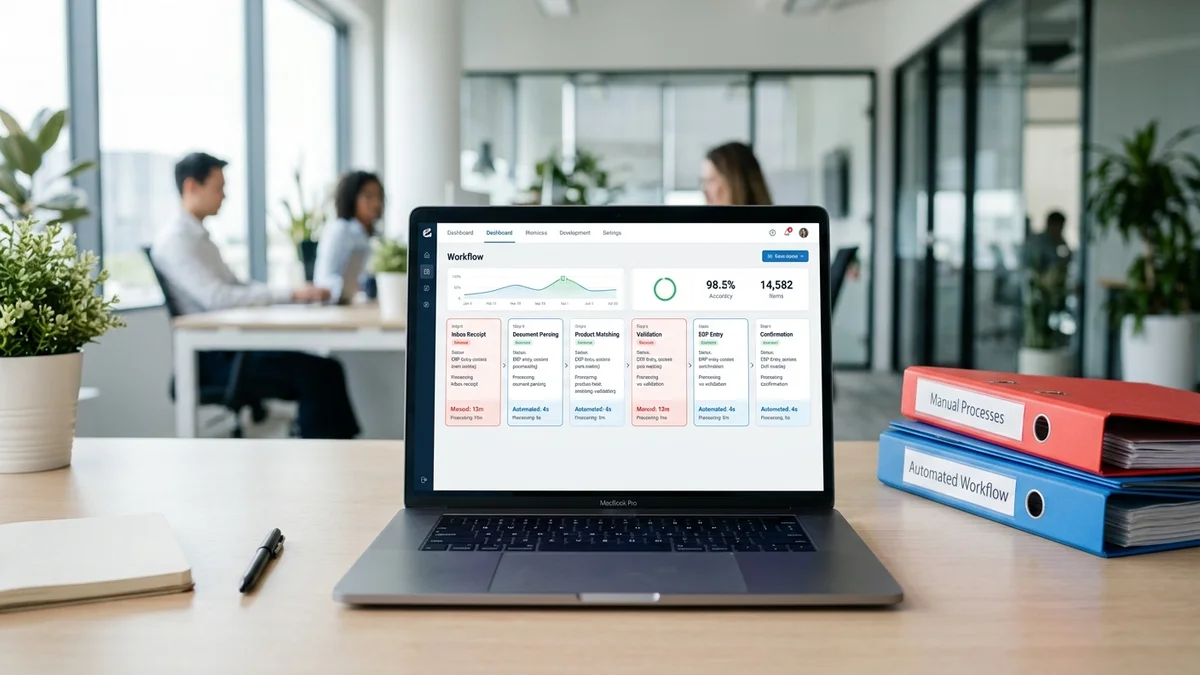
Your order desk runs the same six-step workflow on every order it receives. Someone reads the incoming email, works out what the customer actually wants, matches those product references to your catalog, checks for errors, enters the data into the ERP, and sends a confirmation. It happens hundreds of times per day, by hand, one order at a time.
Manual execution of that workflow takes 3 to 10 minutes per order, depending on how clear the email is and how well the CSR knows the customer. At 200 orders per day, that is 10 to 33 staff-hours of data entry work — every single day.
Order processing automation replaces manual execution at each workflow stage with software. Not all stages automate equally. Some run touchlessly at scale. Others benefit from AI handling the heavy lifting while a human confirms the edge cases. This guide maps the complete workflow, shows exactly where automation applies, and gives you a practical implementation path.
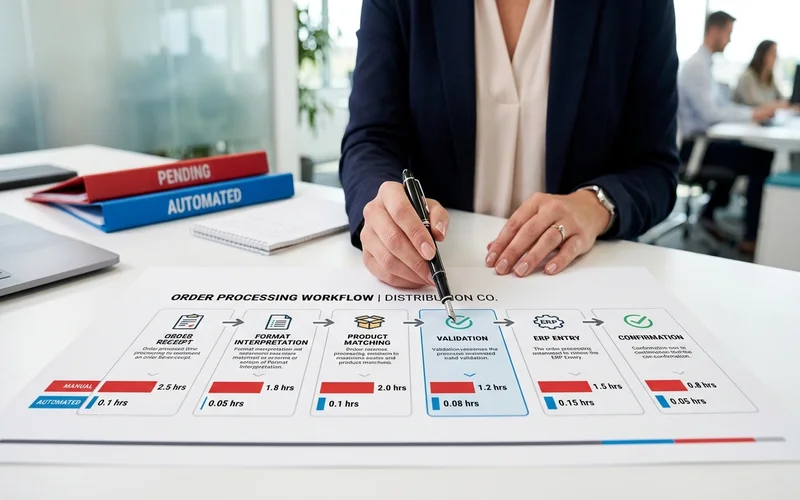
The 6 stages of the order processing workflow
The order processing workflow follows the same sequence across every distribution business, regardless of size, product category, or ERP system. The stages differ in complexity and where errors tend to accumulate — but the structure is consistent.
Stage 1: Order receipt (email, EDI, portal)
The workflow begins when an order arrives. The channel determines the format: EDI sends structured data directly to your system, customer portals submit forms, and email — the most common channel for distribution businesses — arrives in whatever format the customer prefers. A single order email may contain a free-text message, a PDF attachment, a reference to a prior order, and a question about stock availability, all in one thread.
Manual time: 1–2 minutes to open, read, and route for processing.
Stage 2: Format interpretation (read and understand the order)
This is the most cognitively demanding stage. Someone must read the order and understand what the customer is actually asking for. That means interpreting shorthand ("usual order"), resolving ambiguity ("the blue ones"), cross-referencing prior orders ("same as February"), and extracting quantities, product references, delivery requirements, and special instructions from unstructured text.
For an experienced CSR who knows the customer well, this takes 2–4 minutes. For a new hire processing an unfamiliar customer's informal email, it can take 10–15 minutes — with a higher error rate.
Stage 3: Product matching (map to catalog/SKU)
The customer's product references — whether precise codes or informal descriptions — must be matched to SKUs in your catalog. This stage is where the most errors occur. "Blue 40mm fittings" needs to resolve to a specific SKU. "Same spec as February" means pulling up the previous order and identifying which product was on it. Customer-specific terminology, abbreviations, and naming conventions all need to be interpreted before a reliable match is possible.
Manual time: 1–3 minutes for clear orders, longer for ambiguous product descriptions.
Stage 4: Validation and exception handling
Before the order enters the ERP, someone checks for problems: pricing that doesn't match the customer's contract, quantities that exceed stock levels, missing delivery information, or line items that couldn't be matched with confidence. Clean orders move through quickly. Exceptions require a customer call, an internal check, or a judgment call about how to proceed — and those minutes add up.
Manual time: 1–2 minutes for clean orders; 10–20 minutes for orders requiring customer contact.
Stage 5: ERP entry
Validated order data goes into the ERP. This is the most purely mechanical stage: selecting the customer record, entering line items, quantities, prices, and delivery details, and confirming the order in the system. The error risk here is transcription: the wrong quantity, a transposed product code, the wrong unit of measure. Each entry error becomes a downstream problem — a short delivery, a return, a credit note.
Manual time: 2–5 minutes depending on order complexity and the ERP interface.
Stage 6: Confirmation and acknowledgment
The customer receives an order confirmation. For most distributors, this step is still manual: a reply email with the order summary, expected delivery date, and reference number. The step is quick, but it is the last point where an error in stages 2–5 might be noticed — or where a correct order gets delayed because the CSR moved on to the next email before sending the confirmation.
Manual time: 1–2 minutes.
| Stage | Manual Time | Automated Time | Automation Type |
|---|---|---|---|
| 1. Order receipt | 1–2 min | Seconds | Full — inbox monitoring and routing |
| 2. Format interpretation | 2–4 min | Seconds | AI interprets all formats; flags exceptions |
| 3. Product matching | 1–3 min | Seconds | AI matches to catalog/SKU; flags low confidence |
| 4. Validation | 1–2 min | Seconds | AI validates; routes exceptions to review |
| 5. ERP entry | 2–5 min | Seconds | Full — API pushes confirmed data |
| 6. Confirmation | 1–2 min | Seconds | Full — automated confirmation sent |
| Total | 8–18 min | Under 60 sec | Human reviews flagged items only |
See the Automated Workflow With Your Order Formats
Which stages automation handles completely vs. human-in-the-loop
Not every stage automates the same way. Understanding where full automation applies — and where human judgment still belongs — prevents the common mistake of expecting zero human involvement and declaring the project a failure when review is still needed.
Stages that automate completely for standard orders:
- Stage 1 — Email monitoring and inbox triage runs without human involvement.
- Stage 5 — ERP entry is fully automated once the order is validated. The API pushes confirmed data directly.
- Stage 6 — Confirmation emails send automatically on order completion.
Stages where AI handles the work but humans review exceptions:
- Stage 2 (Format interpretation) — AI interprets every format. For high-confidence results, no human review is needed. For uncertain items — unusual phrasing, incomplete product descriptions, ambiguous quantities — the AI flags the specific item and presents its interpretation for confirmation.
- Stage 3 (Product matching) — AI matches all references to your catalog. Items with strong catalog-match confidence proceed automatically. Ambiguous matches are flagged with the AI's proposed match and confidence score.
- Stage 4 (Validation) — AI runs validation rules automatically. Pricing discrepancies, stock issues, and missing data route to human review.
The human-in-the-loop model is a feature of AI-based automation, not a limitation. At Meesenburg Romania, 98% of orders needed no modification after AI processing. The 2% that were flagged took seconds to review — because the AI had already done the interpretation, the matching, and the validation. The human decision was a confirmation, not a reconstruction from scratch.
What an automated order processing workflow looks like in practice
With automation running, the workflow changes from sequential, labor-intensive processing to a parallel, exception-based operation.
An email arrives at 8:14 AM. By 8:14:45, the AI has read it, interpreted the customer's product references, matched 14 of 15 line items to your catalog with high confidence, flagged one ambiguous item, validated pricing and quantities, and prepared the ERP entry. One item appears on the review dashboard: line item 9, "blue gate valve, same spec as last time," needs size confirmation.
A CSR reviews the flagged item, selects the correct SKU, and approves. The ERP entry pushes automatically. A confirmation email goes to the customer.
Total elapsed time: under two minutes, most of it waiting for the CSR to open the dashboard.
Compare that to the manual version: the same CSR opens the email, reads it, checks the prior order for the gate valve reference, looks up the product spec, enters 15 line items into the ERP one at a time, validates pricing, and writes the confirmation. Elapsed time: 10–14 minutes.
The workflow still involves a human. What changes is what the human is doing. Instead of data entry, they are making a decision. That distinction is what makes automation sustainable at scale — and what made the Meesenburg model replicable across their full order volume.
To understand how AI processes email orders at each stage in technical detail, the step-by-step breakdown covers the exact interpretation pipeline from inbox to ERP-ready output.
How to implement order workflow automation
Most workflow automation projects stall not in the technology but in the setup. Here is the sequence that works.
Step 1: Map your current workflow and identify bottlenecks
Before evaluating any tool, spend a day observing your order desk. Document every format that arrives: free-text emails, PDF purchase orders, scanned documents, portal submissions. Note which steps take the longest. Ask your most experienced CSR which orders are the hardest to process and why.
Most bottlenecks sit in Stage 2 (format interpretation) or Stage 3 (product matching). These are the stages where AI provides the most immediate time reduction — and where the Meesenburg results were most pronounced.
Step 2: Choose automation depth (full vs. assisted)
Decide your target automation rate before implementation. Most distributors start with assisted automation: AI handles all stages, humans review all flagged items. Once confidence in the system builds — typically after two to four weeks of live operation — teams shift to full automation for high-confidence orders, reserving human review for the exceptions the system explicitly surfaces.
Setting expectations internally matters. If your team expects 100% touchless automation from day one, any flagged item becomes a perceived failure. If they expect AI to eliminate 90% of processing time and flag the 10% that requires judgment, the same result is a clear win.
Step 3: Configure catalog and ERP integration
The AI matches orders to your catalog. The quality of that match depends on the quality of your catalog data. Before or during implementation, enrich your top 200–500 products with customer-facing descriptions, common abbreviations, and alternate product names. This is the single highest-leverage action you can take to improve automation rates before go-live.
ERP integration connects the AI's output to your system. With pre-built connectors for SAP, Microsoft Dynamics 365, Sage, and similar platforms, this step typically takes days, not months. Unlike generic workflow tools that require you to map every possible input format before anything can automate, AI-based email order processing handles format variability by default — setup is configuring your catalog and ERP connection, not mapping hundreds of customer-specific templates.
Step 4: Define exception handling rules
Exceptions are not failures — they are the system working correctly. Define your exception handling rules upfront: which items trigger human review, who reviews them, and what the expected turnaround is. A clear exception workflow means the team knows exactly what to do when something is flagged. This prevents the pattern where automated exceptions accumulate unreviewed and processing slows down precisely when the system is working as designed.
Step 5: Measure and iterate
Track three numbers after go-live: automation rate (percentage of orders requiring no human modification), exception rate (percentage of line items flagged for review), and processing time per order. These numbers improve over the first four to six weeks as the system learns your catalog patterns and your team refines exception rules. Confidence threshold tuning — tightening or loosening the threshold based on how often flagged items are confirmed without change — is the primary optimization lever.
For a deeper breakdown of each implementation phase, the complete guide covers the pilot, rollout, and optimization sequence in detail.
Live example: Meesenburg Romania workflow transformation
Meesenburg Romania distributes industrial components across multiple product categories. Their order desk was processing a significant volume of orders across multiple channels — email, PDF, and portal — with substantial manual time invested in product matching and ERP entry at every stage.
After implementing AI-based order processing workflow automation:
- 98% of orders needed no modification after AI processing. The system's interpretation matched what an experienced CSR would have entered.
- 50% of orders were fully automated end-to-end, with no human touch between incoming email and completed ERP entry.
- Exception handling shifted from reactive (errors discovered after ERP entry, requiring correction, credit notes, and re-delivery) to proactive (flagged before entry, with the AI's proposed resolution visible and reviewable in one click).
Banciu Nicolae, General Manager at Meesenburg Romania, confirmed these results from live production operations. The transformation was not theoretical — it came from the same email-to-ERP workflow this guide covers, applied to real distribution orders across a real product catalog.
The fastest way to evaluate order processing workflow automation for your operation is to test it on your actual orders. The pilot takes a representative sample of your real order emails — including your most complex and ambiguous ones — and processes them through the automation pipeline. The output shows you matched line items, confidence scores, and flagged exceptions before you commit to a full deployment.
Book a Demo — Map Your Order Workflow Together
Frequently Asked Questions
What is order processing workflow automation?
Order processing workflow automation is software that handles the sequential steps of receiving, interpreting, validating, and entering orders into an ERP system without manual data entry at each stage. For distribution businesses, it converts incoming orders from emails, PDFs, portals, and EDI into structured ERP-ready data, routing exceptions for human review while processing standard orders automatically.
Which stages of the order processing workflow can be automated?
All six stages can be automated to varying degrees. Order receipt, ERP entry, and confirmation send are fully automated for standard orders. Format interpretation, product matching, and validation use AI to process every order automatically, then flag uncertain items for human review rather than passing all work to manual processing. At Meesenburg Romania, 98% of orders needed no modification after AI processing, and 50% were fully automated end-to-end.
How does automation handle exceptions and errors in order processing?
AI-based automation assigns a confidence score to every line item. Items above the threshold proceed automatically. Items below the threshold are flagged in a review dashboard, where a team member sees the AI's proposed match, the confidence score, and alternative options. The reviewer confirms or corrects in a single click. Nothing enters your ERP without passing either the confidence check or human confirmation — which means exceptions are caught before ERP entry, not discovered as errors afterward.
What is the difference between automated and semi-automated order processing?
Fully automated order processing means the order moves from inbox to ERP with no human involvement at any stage. Semi-automated (also called human-in-the-loop) means the AI handles all stages but routes flagged items to a human reviewer before ERP entry. Most distributors start with semi-automated processing and shift toward full automation as confidence in the system builds. The distinction matters less than the time saved — a semi-automated order that takes 15 seconds of human review is a fundamentally different operation than one that takes 8 minutes of manual processing.
How do I start automating my order processing workflow?
Start by mapping your current workflow: document every order format that arrives, identify where processing time is highest, and note the types of orders that cause the most errors. That map becomes your implementation brief. Then run a pilot using a sample of your actual orders — including the most complex and ambiguous ones — before committing to a system. The pilot output tells you whether the system handles your specific catalog, customer base, and order formats before you invest in a full deployment.