Supply chain automation means different things depending on who you ask. Ask a WMS vendor: it's about fulfillment and picking efficiency. Ask a TMS vendor: it's about carrier selection and routing. Ask an ERP vendor: it's about the full business system.
For a mid-market distributor, supply chain automation is about removing the manual steps that slow operations and introduce errors. And the biggest manual step in most distribution businesses isn't in the warehouse or the shipping dock. It's at the front end: someone reading a customer email, looking up products, and typing an order into the ERP.
That's where supply chain automation for distributors should start.
Where order automation fits in the supply chain
The supply chain automation stack layers
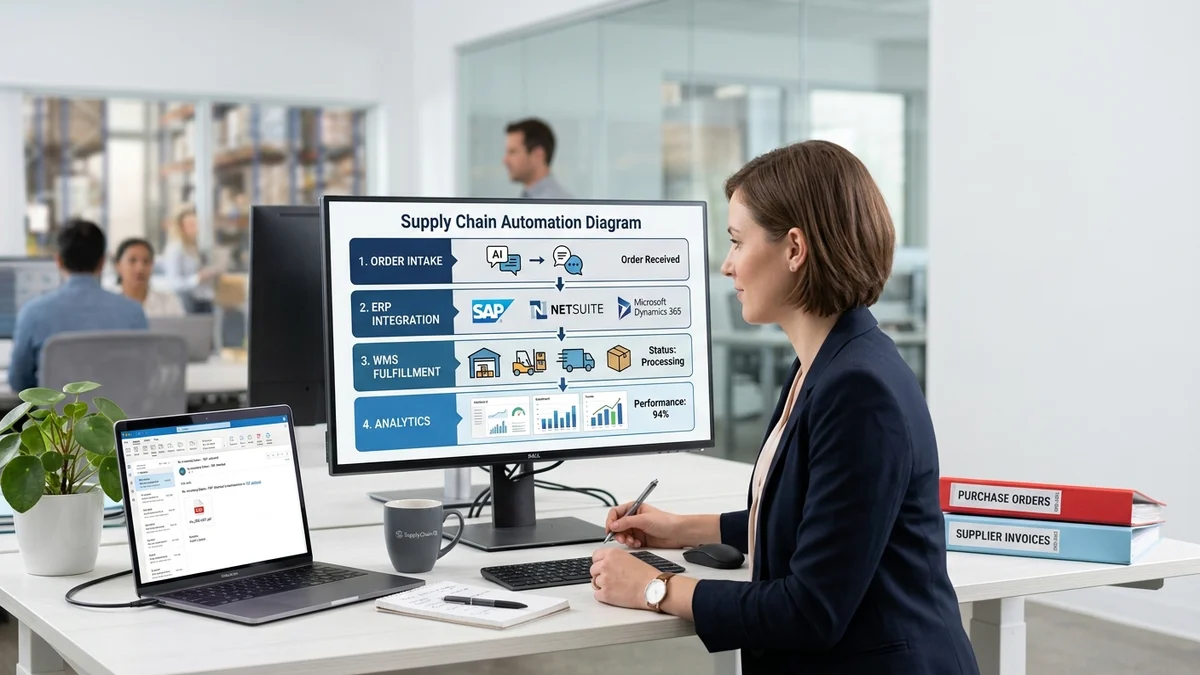
A mid-market distributor's supply chain automation stack has four functional layers:
Layer 1: Order intake. Incoming orders arrive from customers by email, PDF, EDI, portal, or phone. Converting those orders into clean, structured data in the ERP is the intake step. This is the stage most distributors still perform manually.
Layer 2: ERP order management. The ERP confirms the order, checks credit limits and stock availability, and manages the order lifecycle through fulfillment. Most distributors have this layer covered by their existing ERP system.
Layer 3: WMS fulfillment. A warehouse management system receives pick lists from the ERP and manages the physical fulfillment workflow — picking, packing, dispatch, and delivery confirmation. Not all mid-market distributors have a dedicated WMS; many use ERP-native fulfillment modules.
Layer 4: Reporting and analytics. Order cycle time, fill rates, error rates, and cost-per-order metrics come from data at Layers 1 through 3. The accuracy of this reporting depends entirely on the quality of data entering at Layer 1.
Most mid-market distributors are at least partially automated at Layers 2 through 4. Layer 1 is where the manual work persists.
Why order intake is the optimal starting point
The case for starting at intake comes down to two principles.
First, every downstream layer depends on Layer 1 data quality. When order intake is manual, every error introduced at Layer 1 propagates through the ERP (wrong fulfillment instructions), WMS (wrong pick list), invoicing (disputed invoice), and payment (delayed collection). Automating invoicing before automating intake means downstream automation processes Layer 1 errors mechanically. The errors don't disappear — they're processed faster and with less chance of human correction catching them.
Second, intake automation deploys in weeks, not months. Adding an AI order processing automation layer above your existing ERP doesn't require replacing the ERP, upgrading the WMS, or a multi-month IT project. It's an add-on that sits upstream of what you already have and goes live in four to eight weeks.
Starting at intake produces fast ROI and clean data that makes every subsequent automation investment more effective.
The supply chain integration architecture for order automation
Layer 1: Order intake (AI reading any format to structured data)
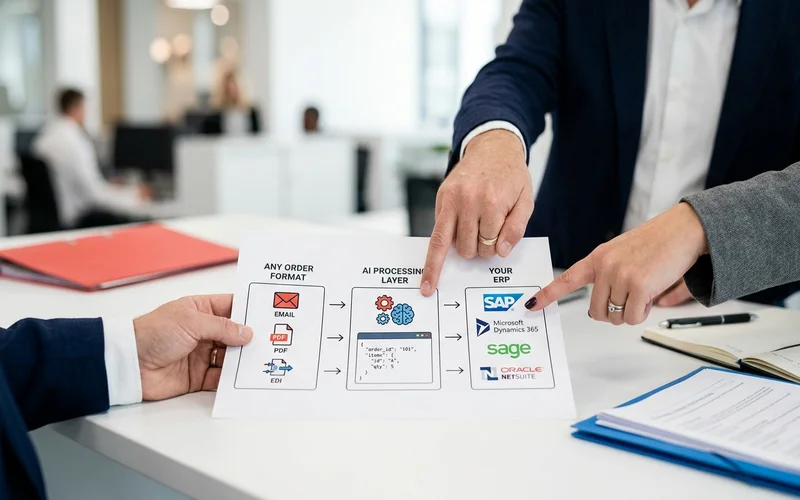
The intake automation layer monitors your email inbox continuously, reads incoming orders in any format, and produces structured output that feeds directly to your ERP. The AI handles the interpretation step: what did the customer order, which products match in your catalog, what quantities and pricing apply.
High-confidence orders push to the ERP automatically. Uncertain line items surface in an exception queue with the AI's proposed match and confidence score visible. The reviewer confirms or corrects in seconds. Nothing enters the ERP without either automated confidence or human confirmation.
For email order processing, the AI reads free-text emails with the same pipeline it uses for structured PDFs — extract meaning, resolve product references, produce confirmed line items. Format variability is handled by default, not by building per-customer templates.
Layer 2: ERP integration (clean data into order management)
Once the AI produces confirmed order data, it pushes to the ERP via API. The ERP's normal order management workflow takes over: order confirmation, credit checking, stock reservation, and fulfillment routing.
ERP order integration is the technical connection between Layer 1 and Layer 2. For SAP S/4HANA, the integration uses OData REST API. For Microsoft Dynamics 365, the Data Management Framework handles sales order creation. For Sage and NetSuite, pre-built connectors handle the push without custom development.
IT setup time for ERP integration is typically five to fifteen hours per deployment using pre-built connectors and standard API endpoints. Ongoing maintenance is under one hour per month.
Layer 3: WMS integration (fulfillment automation)
When clean order data reaches the ERP at Layer 2, the ERP routes fulfillment instructions to the WMS. This is where the Layer 1 quality improvement becomes visible in physical operations: pick lists are generated from correct order data. The wrong-product-picked problem reduces directly with Layer 1 accuracy.
For distributors without a dedicated WMS, ERP-native fulfillment modules handle this layer adequately when data arrives clean from Layer 1. A dedicated WMS becomes more relevant at higher fulfillment complexity or greater volume.
Layer 4: Reporting and analytics (clean upstream data means accurate reports)
With clean data flowing through Layers 1 to 3, the reporting at Layer 4 becomes reliable. Order cycle time is measurable end to end. Error rates are trackable by source. Automation rates are visible by order type, customer, and time period.
Before Layer 1 automation, most distribution businesses can't reliably measure order cycle time because intake timing is variable and unlogged. After automation, every order has a machine-stamped receipt time, interpretation time, exception review time if any, and ERP entry time. The data layer is a byproduct of the automation layer.
Start Your Supply Chain Automation at the Intake Layer
What changes across the supply chain when order intake is automated
The error propagation stops at Layer 1. Manual intake has an error rate of approximately 3% on experienced teams. Automated intake with confidence scoring and human review for uncertain items drops to under 0.5%. Fewer wrong products at Layer 1 means fewer wrong picks at Layer 3, fewer disputed invoices at billing, and fewer customer service calls.
Peak-period scaling is decoupled from headcount. Manual intake throughput caps at the staff count on the order desk. Automated intake processes at constant throughput regardless of volume. A seasonal peak that previously required overtime or temporary staff is absorbed by the automation layer without adding people.
Order desk capacity shifts to higher-value work. When the interpretation-and-entry step is automated, experienced team members aren't spending their days on data entry. Exception review takes seconds per item. The freed capacity goes to proactive customer contact, issue resolution, and growth activities.
Downstream metrics become actionable. When cycle time, error rate, and automation rate are measurable at Layer 1, the data exists to make supply chain optimization decisions. Which customers generate the most exceptions? Which product categories have the lowest match confidence? These questions have answers after Layer 1 automation that didn't exist before.
How to implement supply chain order automation
Phase 1: Automate intake (4 to 8 weeks)
Connect an AI order processing layer to your inbox and ERP. This phase includes:
- ERP API connection and testing (5 to 15 IT hours for most ERPs)
- Catalog preparation: enriching the top 200 to 500 product entries with customer-facing descriptions and alternate names
- Pilot testing: 50 to 100 real orders processed, output compared against manual entry
- Exception queue configuration: who reviews flagged items, what the turnaround expectation is
- Go-live: AI processes live orders, team reviews exceptions
This is the highest-ROI phase and the fastest to implement. It produces clean data at Layer 1 that every downstream phase depends on.
Phase 2: Connect to WMS and ERP automation (3 to 6 months)
With clean intake data flowing from Phase 1, extend automation downstream. This phase may include:
- WMS integration for automated fulfillment routing from ERP-confirmed orders
- ERP workflow automation for credit checking, stock reservation, and order confirmation emails
- EDI setup for large accounts that have EDI infrastructure
- Finance automation for invoicing and AR collections
Phase 2 builds on the clean data foundation from Phase 1. Each downstream automation works better because it's processing accurate upstream data.
Phase 3: Analytics and continuous improvement (ongoing)
With automation across Layers 1 to 3, the data layer becomes reliable enough for continuous improvement decisions.
Order cycle time by customer segment: which accounts are slowest and why? Automation rate by order type: which categories have lower automation rates and what's the pattern? Exception source analysis: are recurring exceptions from specific customers suggesting a catalog enrichment opportunity?
Phase 3 doesn't require additional technology in most cases. It requires analytical discipline applied to the data that the automation stack is now producing reliably.
Common integration patterns for distribution businesses
Pattern 1: Add-on intake layer above existing ERP. The most common pattern. The distributor has an existing ERP and adds an AI intake layer that pushes to the ERP via API. No ERP replacement required. No WMS change needed. The intake automation layer is purely additive.
Pattern 2: Simultaneous intake and WMS. Some distributors automate intake and WMS in the same project. The recommendation is still to validate Layer 1 accuracy before extending downstream. Parallel projects introduce risk when the intake accuracy that downstream systems depend on isn't established yet.
Pattern 3: Intake during ERP migration. Some distributors are planning an ERP upgrade and want to know if intake automation makes sense before the new ERP is live. It typically does: the intake automation layer is ERP-agnostic and can be reconnected to the new ERP when it goes live. Pilot data from the existing ERP deployment transfers.
The complete guide to order processing automation covers Phase 1 intake automation implementation in detail, including the pilot structure and go-live sequence.
Live supply chain integration: Meesenburg Romania
Meesenburg Romania's supply chain automation deployment illustrates what Phase 1 intake automation produces in a real distribution operation.
Before automation, incoming orders required manual interpretation, product lookup, and ERP entry. The order intake step consumed the majority of the order desk's daily capacity. Downstream supply chain stages inherited whatever errors the manual step introduced.
After implementing AI order intake automation:
- 98% of orders needed no modification after AI processing. Layer 1 data quality improved dramatically, reducing error propagation to downstream stages.
- 50% of orders completed end-to-end from email receipt to ERP entry with no human involvement.
- Downstream supply chain stages including fulfillment and invoicing operated on cleaner data as a direct consequence of Layer 1 improvement.
Banciu Nicolae, General Manager at Meesenburg Romania, confirmed the operational shift. The supply chain improvement wasn't isolated to the order desk; it was visible in fulfillment accuracy and downstream operational efficiency.
Book a Demo — Map Your Supply Chain Integration Together
Frequently Asked Questions
What is supply chain order automation?
Supply chain order automation covers the four layers from order receipt to fulfillment: intake automation (email/document to ERP data), ERP order management, WMS fulfillment, and analytics. Most mid-market distributors are automated at Layers 2 to 4 and manual at Layer 1.
Where should distributors start with supply chain automation?
Start at intake. It's the fastest to deploy (4 to 8 weeks), delivers the highest ROI, and creates clean data that every downstream layer depends on. Automating invoicing or WMS before intake means downstream automation inherits Layer 1 errors.
How does order intake automation integrate with WMS and ERP systems?
The intake layer connects to your ERP via API and pushes confirmed order data to the ERP's sales order entry endpoint. The ERP routes fulfillment to the WMS through its normal workflow. Pre-built connectors cover SAP, Dynamics 365, Sage, and NetSuite without custom development.
How long does supply chain order automation take to implement?
Phase 1 intake automation takes 4 to 8 weeks. Connecting downstream WMS and ERP workflow automation takes an additional 3 to 6 months. The intake layer always goes live first and delivers ROI before the broader supply chain automation is complete.
What is the ROI of supply chain order automation?
Intake automation alone typically produces first-year net savings of $200,000 to $500,000 for mid-market distributors through labor reduction, error cost reduction, and peak-period scaling. Downstream supply chain benefits compound over time as fulfillment accuracy and invoice dispute rates improve.