Order capture is the most important stage in the order processing workflow. It's also the most underestimated.
Every efficiency gain downstream — faster fulfillment, fewer errors, cleaner invoicing, reliable reporting — depends on capture quality. When capture is manual, someone reads an email and types what they understood into the ERP. Every step in that process introduces variability. Different CSRs interpret ambiguous descriptions differently. Unfamiliar product names slow everyone down. At peak volume, speed increases error rate.
When capture is automated, every downstream stage starts with the same clean, consistent, validated data. This is why order capture is where automation delivers the highest leverage in the entire order processing chain.
What is order capture in B2B distribution?
Order capture vs. order management — the critical distinction
"Order management" covers the full lifecycle of an order after it enters your ERP: confirmation, fulfillment, invoicing, payment. Your ERP handles most of this well. The gap in most distribution operations isn't order management — it's order capture.
Order capture is the step before the order enters the ERP: receiving the customer's communication in whatever form it arrived, reading it, interpreting what was ordered, matching products to your catalog, and producing structured ERP-ready line items.
The ERP can manage an order lifecycle perfectly once the data is in. Getting the data in is the problem.
Why capture quality determines everything downstream
A wrong product code entered at capture creates a wrong fulfillment pick. A wrong quantity creates a wrong shipment. A missed line item creates a disputed invoice. The industry benchmark for the fully loaded cost of a single order entry error is $18,000, including direct costs (returns, re-shipments, credit notes) and the indirect costs of customer service time and relationship damage.
These costs are created at capture. They're paid downstream. Fixing them downstream is expensive; preventing them at capture is the highest-leverage intervention in the chain.
The order formats AI order capture handles
Structured formats: EDI, structured PDFs, portal orders
Structured formats are the easiest capture problem. EDI transactions (X12 850 purchase orders, EDIFACT equivalents) arrive as machine-readable data with standardized fields. Structured PDFs from large customers who use consistent document layouts are predictable enough for extraction. Portal orders submitted through a web form arrive as pre-structured data.
AI order capture handles these formats correctly — but they're not where the capture challenge lives. Most mid-market distributors receive these formats from their largest, most established accounts. These accounts typically represent 30 to 40% of order volume and a smaller percentage of processing headcount, because their structured formats are relatively quick to handle.
Semi-structured formats: email with PDF attachments
A significant share of distribution orders arrive as emails with PDF attachments: a customer's purchase order document, attached as a PDF, in a format that varies by customer and sometimes varies within a customer's own documents over time.
Semi-structured PDFs present a harder capture problem than fully structured EDI. The document contains the right information, but its layout may change, field positions aren't guaranteed, and informal text often accompanies the attachment ("attached PO for this week, please confirm by Thursday").
AI order capture handles semi-structured PDFs by using OCR to extract text from the document image, then applying language models to identify and extract order content from the extracted text. The layout doesn't need to match a pre-configured template — the AI reads the meaning of what's on the page.
Unstructured formats: free-text email, WhatsApp, handwritten notes, photos, and scanned documents
Unstructured formats are where the capture challenge is most acute, and where most traditional automation tools fail completely.
Free-text email is the predominant format for most mid-market distributors' smaller and medium accounts. The customer writes what they want in plain language: "Hi, can you send us 6 of the 40mm blue couplings and 2 boxes of the seal kit we ordered in March? Hold the valves for now — we'll order those separately." This contains a real order with specific products, quantities, and instructions. It also requires understanding prior order context ("the seal kit we ordered in March"), interpreting informal product names ("40mm blue couplings"), and recognizing a deletion instruction ("hold the valves").
Template-based automation fails on this entirely. AI capture handles it by applying language models to extract intent: what was ordered, in what quantity, with what modifications.
WhatsApp messages are an emerging capture channel, particularly in markets where WhatsApp is a primary business communication tool. A field sales rep or small customer sends order requests via WhatsApp. The content may be informal text, a photo of a handwritten list, or a voice message transcription. Email order processing pipelines can extend to WhatsApp channels with the same AI interpretation layer.
Handwritten notes and photos present a two-step capture problem: first OCR to convert the image to text (handling varying handwriting styles, paper quality, and image angles), then language understanding to interpret the extracted text as an order. AI capture handles both steps in the same pipeline. The accuracy is lower on difficult handwriting than on clear digital text, which is why confidence scoring matters more here: uncertain items from handwritten sources are routed for review rather than processed automatically.
Scanned documents (faxed POs converted to PDF, printed documents scanned and emailed) combine the OCR challenge of image-to-text conversion with the layout variability of semi-structured documents. AI capture reads these the same way it reads handwritten notes: OCR to extract text, language model to interpret content.
See AI Order Capture With Your Actual Order Formats
How AI order capture works — step by step
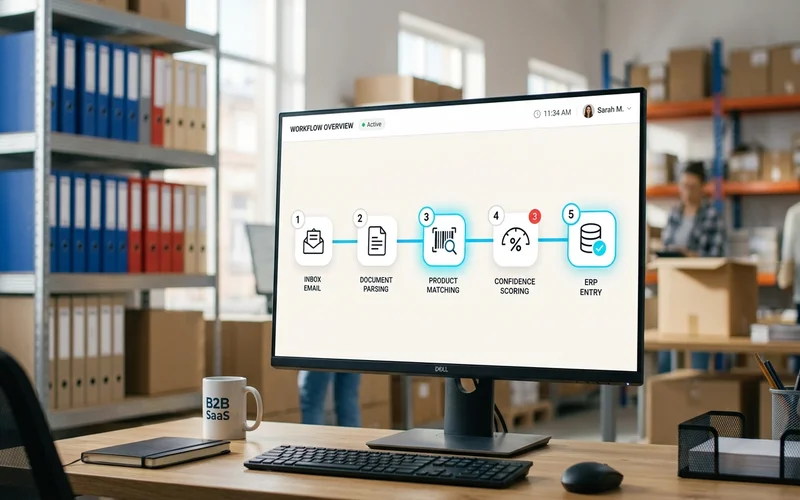
Step 1: Monitor all order channels continuously
The capture system monitors every channel where customer orders arrive: email inbox, WhatsApp business account, fax-to-email, and any portal integrations. Monitoring is continuous — orders are captured as they arrive, not in scheduled batches. For a distributor processing 200 orders per day, the average time from customer send to system receipt is under a minute.
Step 2: OCR plus NLP to extract meaning from any format
When an order arrives, the system applies two processing steps in sequence.
OCR converts non-text content to text: PDF pages to text, image attachments to text, handwritten photos to text. OCR quality varies with input quality — a clean digital PDF produces near-perfect text; a dark photo of handwriting produces text that requires correction downstream.
NLP (natural language processing) using language models interprets the extracted text as order content. This is the step that makes AI capture different from template-based automation. The language model understands context and intent: "same as last week" triggers an order history lookup; "hold the gaskets" identifies an exclusion instruction; "the usual blue fittings" requires catalog matching against prior order history.
Together, these two steps convert any input — clean PDF or informal WhatsApp message — into a structured representation of what the customer ordered.
Step 3: Product matching to your catalog
The output of Step 2 is an interpreted order: quantities, descriptions, instructions. The output of Step 3 is matched SKUs.
Catalog matching resolves informal customer descriptions to specific catalog entries. This is the hardest technical step in order capture. Customers use their own vocabulary for products: nicknames, abbreviations, prior order references, and descriptions that don't appear anywhere in your catalog. An experienced CSR who knows the account resolves these from memory. AI order capture builds this knowledge into a semantic catalog model — and refines it from every order processed.
The accuracy of catalog matching improves over the first six weeks of live operation as the system accumulates corrections and builds account-specific vocabulary into its matching model. A deployment that starts at 92% no-modification accuracy is typically at 96 to 98% by week six.
Meesenburg Romania reached 98% no-modification accuracy in production — meaning the AI's proposed catalog match was accepted by the team without correction on 98% of order lines. That's the standard that well-trained catalog matching reaches on a real distribution catalog.
Step 4: Confidence scoring and exception flagging
Every matched line item receives a confidence score reflecting how certain the system is about its interpretation. Items above the confidence threshold for automatic processing proceed automatically. Items below the threshold are flagged in an exception queue.
The exception queue presents the uncertain item with the AI's proposed match, the confidence score, and the specific reason for uncertainty. The reviewer sees what the AI saw and why it was uncertain. A confirmation takes seconds. A correction provides training data for the next similar item.
The exception queue is a quality control layer, not a failure mode. A system without visible confidence scoring either processes uncertain items automatically (dangerous — wrong data enters the ERP without detection) or has no genuine confidence model (it's not doing what it claims). A visible, well-designed exception queue is evidence that the system is honest about uncertainty.
Step 5: Structured output to ERP
Confirmed order data pushes to the ERP via API as structured sales order entries. The ERP receives the same format regardless of what the incoming order looked like: confirmed line items with SKU, quantity, price, and customer account reference.
For AI order processing connected to SAP, Dynamics 365, Sage, or NetSuite, pre-built API connectors handle the push. The ERP sees a standard API call with valid order data. No manual field mapping. No screen automation. No batch file import. The order goes directly into the ERP's order management workflow.
What changes when order capture is automated
Processing time per order drops from minutes to seconds. Manual capture takes 5 to 15 minutes per order depending on complexity. Automated capture takes under 60 seconds including exception review for items that are flagged. At 200 orders per day, that's several hours of daily processing time eliminated from the order desk.
Error rate drops from 3% to under 0.5%. The 3% manual error rate is consistent across industries for experienced teams; it's a function of the interpretation task, not staff quality. Automated capture with confidence scoring and human review for uncertain items reduces this to under 0.5% in practice. Fewer errors at capture means fewer wrong shipments, fewer credit notes, and fewer customer service calls downstream.
Any format becomes the same outcome. A structured EDI from a major account and an informal WhatsApp from a small customer both produce the same structured output entering the ERP. Format variability at the input is normalized to format consistency at the output.
Peak periods don't require more staff. Manual capture throughput is fixed by headcount. Automated capture throughput scales with order volume. The same team processes a Monday morning peak and a quiet Wednesday afternoon without overtime or backlog.
For the detailed technical walkthrough of what the AI does with an email order from receipt to ERP entry, see how AI processes email orders. For the full workflow context including exception handling and team adoption, see AI order processing for distributors.
Live order capture in production: Meesenburg Romania
Meesenburg Romania's deployment is the production reference for what AI order capture produces on a real distribution inbox.
Their order intake covered a mix of formats typical of mid-market distribution: structured documents from larger accounts alongside informal emails and varied PDF attachments from a broad base of smaller customers. Their catalog contains thousands of SKUs with complex variant relationships across multiple product categories.
Before automation, every incoming order required a CSR to read it, interpret the customer's vocabulary, match products to the catalog, and enter line items manually. The capture step was the primary activity of the order desk.
After implementing AI order capture:
- 98% of orders needed no modification after AI processing. The system's catalog matching accuracy on real production data meant the team accepted output without correction on 98% of order lines.
- 50% of orders completed from email to ERP entry with no human involvement.
- For the remaining 50%, human involvement was seconds of exception review per item — not minutes of manual re-entry.
Banciu Nicolae, General Manager at Meesenburg Romania, confirmed the operational shift. Capture was no longer the primary activity of the order desk. Exception judgment calls replaced data entry as the team's primary work.
How to get started with order capture automation
Run a capture accuracy test on your actual orders. Take 50 to 100 orders from the past 30 days, including your most informal and varied formats. Ask an AI order capture vendor to process them and show you the output: matched SKUs, confidence scores, flagged exceptions. Compare the output against what your team would have entered. That comparison is the empirical accuracy baseline for your specific catalog, customers, and formats.
Prepare your catalog before deployment. The accuracy of catalog matching directly reflects the quality of the catalog it matches against. Enriching the top 200 to 500 products with customer-facing descriptions, common abbreviations, and alternate names takes a few days and produces a measurable accuracy improvement in the pilot. Don't skip this step.
Define the exception handling workflow. Who reviews flagged items? What's the turnaround expectation? What happens when an exception can't be resolved without contacting the customer? Teams that define this before go-live adopt the exception queue faster than teams that discover the workflow questions after go-live.
Set realistic expectations for week one. Accuracy at week one is typically lower than accuracy at week six. The system improves as it accumulates corrections and builds account-specific vocabulary. A team that measures accuracy at week one and compares it to a six-week steady state may underestimate what the deployment will achieve.
Book a Demo — Show Us Your Hardest Order Formats
Frequently Asked Questions
What is order capture automation?
Order capture automation automatically reads incoming orders from any channel or format — email, PDF, EDI, WhatsApp, handwritten notes — extracts order content, matches products to a catalog, and produces structured ERP-ready data without manual re-keying. It's the first stage of the order processing workflow and the one with the highest leverage on downstream quality.
What order formats can AI order capture automation handle?
Structured EDI, structured PDFs, email with PDF or spreadsheet attachments, free-text email in plain language, WhatsApp messages, and handwritten or scanned documents. No template is required for any format.
How does AI order capture differ from OCR?
OCR extracts characters from images. AI order capture adds language understanding: it interprets what the extracted text means as an order, matches products to a catalog, and produces order intent. OCR is a component of AI capture; it's not a substitute for it.
What happens when the AI can't confidently capture a line item?
Uncertain items are flagged in an exception queue with the AI's proposed match and confidence score visible. A reviewer confirms or corrects in seconds. Nothing uncertain enters the ERP without human confirmation. This is the design working correctly.
How quickly can I implement order capture automation?
Four to eight weeks from kickoff to live order processing. No per-customer template configuration is required. The AI handles format variability by default, so deployment time is primarily ERP API connection, catalog preparation, and pilot testing.