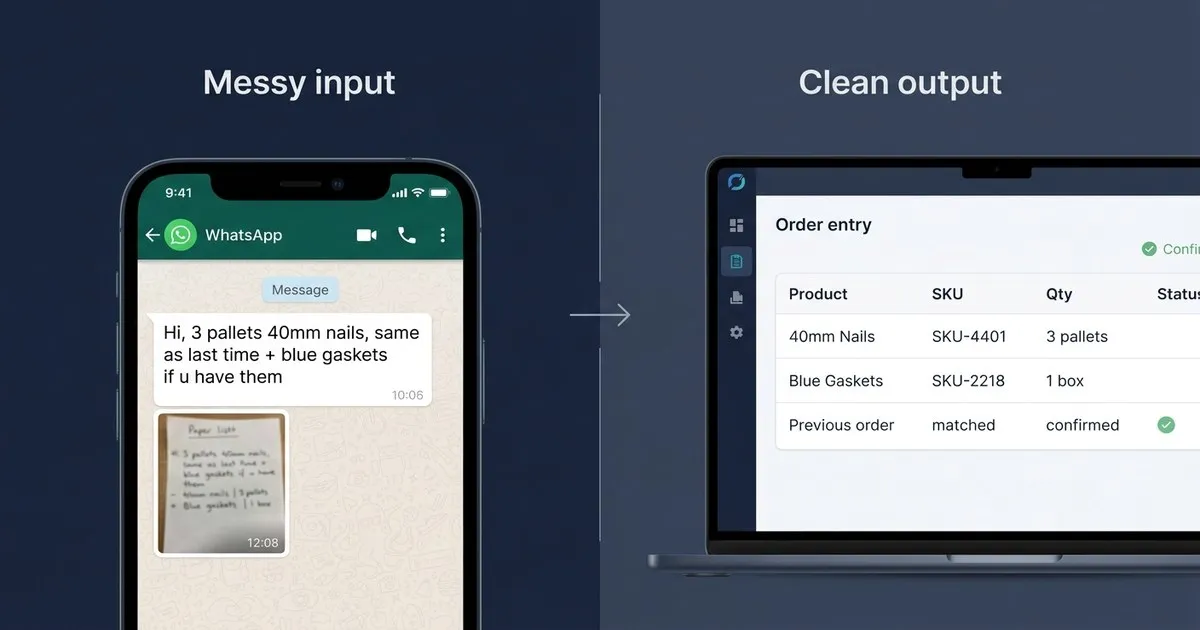
Your customer sends a WhatsApp message at 7:43 AM: "Hi! 3 pallets of the 40mm ones, same price as last time, and if you have the blue gaskets in stock add 2 boxes. Thx."
By the time your team starts work at 8, three more have arrived. One is a voice note. Another is a photo of a handwritten list, shot at an angle on a phone camera.
None of these will ever appear in your ERP unless a human manually re-enters them. That person is likely your most experienced CSR, who could be doing something more valuable than deciphering blurry photographs.
This article explains how AI-based order processing handles WhatsApp orders specifically, what separates it from the tools that will fail on informal messages, and what real-world results look like on messy, unstructured input.
Why WhatsApp Orders Aren't Going Away
The instinct for many distribution businesses is to push customers toward structured ordering: a web portal, a standardized PO form, an EDI connection. Clean inputs, no ambiguity.
Most customers won't do it.
The relationship your best customers have with your sales or customer service team was built on convenience. They text. They voice-note. They send a photo of the shelf that's running low. Asking them to log into a portal is asking them to change a habit they've had for years, for your operational convenience.
In DACH and across Eastern Europe, WhatsApp is deeply embedded in B2B supplier relationships. It's the same story in food distribution, building materials, spare parts, and most other wholesale categories. This isn't going to change. What can change is how your back office handles what comes in.
The Real Problem: WhatsApp and Your ERP Don't Talk
Every WhatsApp order your team receives has to clear the same hurdle: someone has to read it, interpret it, find the right SKU in your catalog, verify stock, and key it into the ERP. For a structured PDF purchase order, this takes maybe two minutes. For a voice note that says "same as last time but skip the smaller valve and add whatever you recommend for the sealing," it takes considerably longer — and even the most experienced rep will occasionally guess wrong.
The error cost is real. Industry data puts the fully loaded cost of a single order error at around $18,000 when you account for the re-shipment, the credit note, the time spent resolving it, and the relationship damage. At a 3% error rate on 200 orders a day, you're sitting on 6 problem orders every day. WhatsApp orders, because they're informal and often ambiguous, tend to have a higher error rate than structured POs.
Scale doesn't help. Every new customer who prefers WhatsApp adds to the load. The only way to handle it today is headcount, and headcount scales linearly with volume at a time when margins in distribution don't.
Why Standard Automation Tools Break on WhatsApp Messages
If you've looked at automation before, you've probably encountered three categories of tools: OCR, EDI, and RPA. Each one fails on WhatsApp orders for a specific reason.
OCR was built for structured documents — invoices, purchase orders with defined fields, forms with consistent layouts. It extracts characters from a predictable visual structure. A WhatsApp message is free-form text (or an audio transcription, or a low-resolution photo). OCR has nothing to match against.
EDI requires your trading partners to conform to a data standard. It's the right tool for large enterprise customers with their own structured procurement systems. For the customer who orders via WhatsApp because it's fast and easy, EDI is not an option. They won't adopt your standard.
RPA automates repetitive, rule-based processes. It works when inputs are consistent. "Same as last time plus 2 boxes of blue gaskets" is not consistent. The rule would need to be rewritten each time a customer changes how they phrase their order — which is constantly.
None of these tools interpret meaning. They look for patterns, and WhatsApp orders don't follow patterns.
How AI-Based Order Processing Actually Works on Informal Messages
The shift that makes the difference is moving from pattern matching to language understanding.
When an AI system built for order processing reads "3 pallets of the 40mm ones, same price as last time, blue gaskets if you have them," it doesn't look for a template to match it against. It reads the message the way your most experienced CSR reads it: understanding that "40mm ones" refers to a specific SKU in your catalog that this customer orders regularly, that "same price as last time" is a note for the order confirmation and not a product line, and that "if you have them" on the gaskets means to check stock before adding.
The system assigns a confidence score to each interpreted line item. If it's certain, the line goes straight through. If it's uncertain — the "blue ones" could be two different SKUs, for example — it flags that line for human review before anything enters your ERP. The human sees the original message, the AI's interpretation, and the confidence score. They confirm or correct. The confirmed order enters the ERP.
This is what makes the approach different from the tools that failed before. There's no template to maintain. When a customer changes how they send orders (which happens constantly), nothing breaks. The AI interprets the new message the same way it interpreted the first one.
Voice notes work the same way, via transcription followed by interpretation. Photos of handwritten lists go through OCR to extract the text, then through the same language understanding layer.
The Meesenburg Numbers on Real-World Messy Input
Meesenburg Romania, a distribution company handling building and industrial supplies, processes orders from customers who send everything from structured PDFs to handwritten lists photographed on phones.
After deploying OrderFlow:
- ~98% of orders required no modification after AI processing
- 50% were fully automated end-to-end (zero human touch)
- General Manager Banciu Nicolae has confirmed the results publicly
Those numbers come from real order data, not a controlled demo environment. The input includes the informal, inconsistent, and ambiguous messages that make automation hard.
The remaining 50% aren't failures: they go through the human-review step because the AI flagged something it wasn't confident about. A rep confirms or corrects the line item in seconds, and the order enters the ERP. Compare that to the current state, where 100% of those same orders require a rep to read, interpret, and key them manually.
What This Looks Like for Your WhatsApp Orders Specifically
The integration doesn't require your customers to change anything. They keep messaging the way they always have.
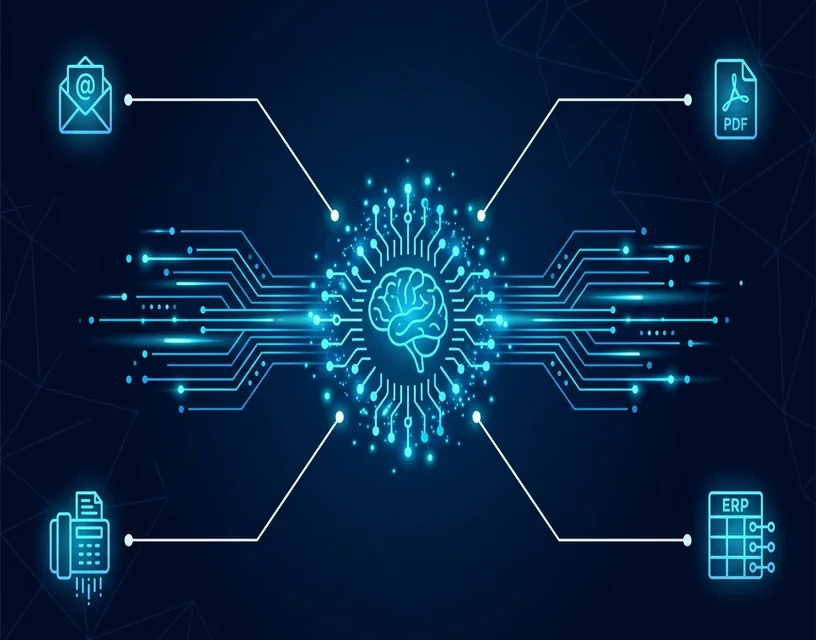
On your end, incoming WhatsApp messages are processed through the same AI layer as email orders, PDF attachments, and any other format. The output is consistent regardless of input format: structured, ERP-ready order data with confidence scores and flagged exceptions.
Your team's role shifts. Instead of manually entering 80 orders a day, they're reviewing 8 flagged exceptions and confirming the line items the AI wasn't certain about. The order entry work that currently consumes most of your CSR team's time gets compressed to a fraction.
For the IT side: OrderFlow outputs structured data via API to your ERP (SAP, Microsoft Dynamics 365, Sage, or custom integration via PoC). The integration is done once. GDPR compliance and EU data residency are built in, not bolted on — customer order data stays in Europe. No ongoing IT maintenance is required to handle new customers or new message formats.
The Monday Morning Before and After
Before: 47 messages in the WhatsApp group when your team logs in at 8 AM. Eight of them are orders. Two are voice notes. One is a blurry photo. Your best rep spends the first 90 minutes just clearing the backlog, and still enters one wrong SKU on the voice note order because the customer mumbled the quantity.
After: By the time your team arrives, the weekend's orders are already processed and in the ERP. Your rep opens three flagged exceptions, confirms the line items the AI marked uncertain, and moves on to actual customer work by 8:15.
The difference isn't just efficiency. It's what your team does with the hours they get back.
See If It Works on Your Orders
The fastest way to know whether this handles your WhatsApp orders is to run them through it.
Send us four or five of the messiest messages your team received this week — voice note transcripts, blurry photos, the "same as last time plus some things" messages. We'll process them through OrderFlow and show you the output: line items matched to your catalog, confidence scores, and the exceptions that would be flagged for review.
If the output is what you'd want to hand to your ERP, we talk further. If it isn't, you've spent 20 minutes finding that out before committing to anything.